
helloworld
jpa/ h2 본문
나중에 oracle이나 mysql이랑 비슷할거같기도하당.
<dependency>
<groupId>org.springframework.boot</groupId>
<artifactId>spring-boot-starter-data-jpa</artifactId>
</dependency>
<dependency>
<groupId>com.h2database</groupId>
<artifactId>h2</artifactId>
<version>2.1.214</version>
<scope>runtime</scope>
</dependency>
<groupId>org.springframework.boot</groupId>
<artifactId>spring-boot-starter-data-jpa</artifactId>
</dependency>
<dependency>
<groupId>com.h2database</groupId>
<artifactId>h2</artifactId>
<version>2.1.214</version>
<scope>runtime</scope>
</dependency>
우선 관련 기능을 dependency에 추가한다
그 후 yml 파일에서
datasource:
url: jdbc:데이터베이스url;NON_KEYWORDS=USER
username: sa
h2:
console:
enabled: true
jpa:
show-sql: true
defer-datasource-initialization: true
url: jdbc:데이터베이스url;NON_KEYWORDS=USER
username: sa
h2:
console:
enabled: true
jpa:
show-sql: true
defer-datasource-initialization: true
넣어준다. show sql은 실행시키는 database 쿼리문을 보기 위한 설정이다.
defer-datasource-initializaion은 h2 database가 2.xx 이상 버전일 때에는 추가해줘야한다고한다.
non_keywordes=user 는 예제의 도메인 클래스가 user인데 user는 h2의 예약어라 사용할 수 없다고 에러가 나더라..
그래서 user사용한다는 설정이다
강의가 예전버전이라 에러가 굉장히 많이 났다.
ㅠㅠ 찾는데 한세월
user에 현재 시간을 넣는 함수도 있었는데 sysdate()로 하니 에러가 나서 구글을 뒤져보니
current_timestamp()라는 함수를 사용하면 되더라 ..
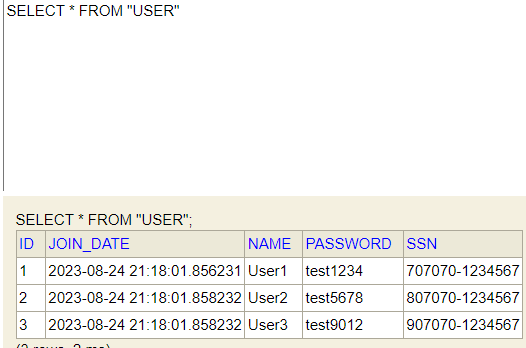
찾느라 고생했다 ...
아참 초기 데이터를 넣을때에는 resources 폴더 아래에 ~~~.sql 이라는 파일을 만들어서 안에 쿼리문을 넣어주면 된다.
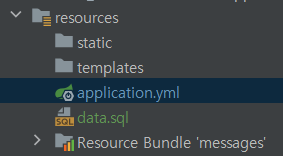
그럼 스프링이 sql 파일먼저 읽어준다고 하는군 ..
insert into user values(1,current_timestamp(),'User1','test1234','707070-1234567');
insert into user values(2,current_timestamp(),'User2','test5678','807070-1234567');
insert into user values(3,current_timestamp(),'User3','test9012','907070-1234567');
insert into user values(2,current_timestamp(),'User2','test5678','807070-1234567');
insert into user values(3,current_timestamp(),'User3','test9012','907070-1234567');
'restful' 카테고리의 다른 글
| jpa / id값으로 유저정보 가져오기 (0) | 2023.08.24 |
|---|---|
| jpa crud기능 사용(select) (0) | 2023.08.24 |
| HATEOAS (0) | 2023.08.17 |
| 버전관리 (0) | 2023.08.17 |
| 데이터 필터링 심화과정 (0) | 2023.08.13 |
'restful' Related Articles
more
